UG
UGBosch ME7 · VW / Audi
Edit. Flash.
Log.
Tuning suites for Bosch ME7 ECUs, built one platform at a time by someone who actually reverse-engineered the binaries. Named and scaled maps, checksums corrected on export, OBD flashing and live logging — one app, one cable.
Windows 10 / 11 · Any J2534 cable · Nothing phones home
Pick your
platform
Every address in a build is tied to one software version, so each platform gets its own build rather than one binary that guesses. Two are finished. Two are being worked on.
What every
build does
The tabs differ by platform, but the machinery underneath is the same one everywhere.
Editor
Maps you can read
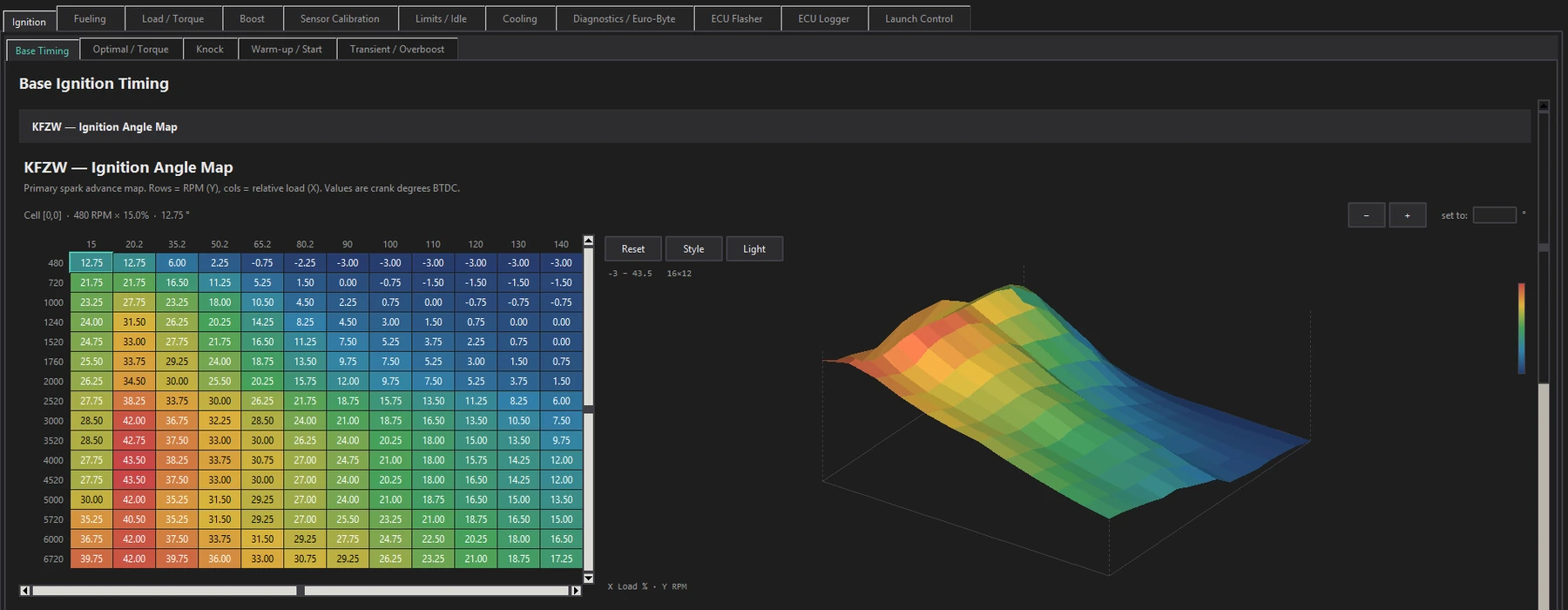
Named, scaled and grouped by what they do, not listed by address. Heat-shaded grids with a pop-out 3D surface on the same colour ramp, and a warning before you edit an axis six other maps share.
Flasher
Read and write over OBD
Any J2534 cable that does K-line. Checksums corrected before the write, then verified. Dry run, recovery mode, and a debug console that tells you what actually happened.
Logger
Live data, same cable
Reads existing ME7Logger definitions, picks up your channels and rate, and writes CSV that opens in any log viewer — German channel descriptions translated to English on the way out. Live values and a pop-out graph while you drive.
What's being
built now
Development notes as the work happens — including what has not been proven yet. The dev blog has the detail.
Flex fuel · ME7.5
Reads the tank, not the pump
Ethanol content from a standard flex sensor, scaling fuelling from 1.00× to 1.49×, blending between petrol and E85 ignition tables, and scaling cold enrichment with it. Bench verified across the full range; no engine has run it yet.
Research · M5.9 / M3.8
Old Motronic checksums
The checksum layout on 1990s Motronic ECUs, worked out from a controlled before-and-after pair and published with the scripts — including the part that is still open.
Speed density · ME7.5
Running without a MAF
Manifold pressure from a real sensor feeding the ECU's own air model instead of the air meter, with the factory throttle-angle estimate as the failure path. Written and simulated; it has not cranked an engine yet.
VR6 beta
Watching the ECU read a map
Replay a log against the binary and see which cells the ECU actually interpolated — all four corners with their weights, with dwell shading across a drive. Checked against the ECU's own published output.
Cables
it works with
Any J2534 pass-through that can do ISO9141 / KWP2000 on K-line. The tool drives the cable through its own PassThru DLL, so if the manufacturer ships a working driver it will work.
Any J2534 pass-through
It has to speak ISO9141 / ISO14230 on K-line. Tactrix OpenPort 2.0 and Topdon ArtiDiag both work. Browse to the DLL, or let it find one in the registry.
Use the 32-bit driver
The tool is a 32-bit build, so it needs the 32-bit PassThru DLL. The device picker flags a 64-bit mismatch up front rather than failing halfway through a session.
Not supported
Dumb FTDI or KKL 409.1 cables, Prolific clones, and anything CAN-only. There is no raw-serial path — the ECU needs a K-line handshake these cannot do.
Read this before you flash
- Save a full read of your stock file and keep a copy somewhere other than the tuning laptop. It is the only way back.
- Put a charger on the battery. Voltage sag mid-write is the most common way this goes wrong.
- Close everything else, turn off sleep, and do not unplug the cable while a write is running.
- If a write does get interrupted, the ECU needs boot-mode recovery on the bench. This tool does not do boot mode — that is a separate job with a separate rig.
- Sold for off-road and competition use. What you do with it on a road car is on you.
New to ME7? Read the S4wiki tuning guide before you change anything. This tool gives you the maps; it will not tell you what to put in them.